Introduction to Lightning Lanes
Lightning Lanes (LL) are Disney’s way of letting you skip the standby line and squeeze more fun into your park day. Sounds simple, right? But if you’re a first-timer — or even if it’s been a few years since your last visit — the system can feel a little overwhelming at first. Don’t worry: with a little planning and flexibility, you’ll be navigating Lightning Lanes like a pro.
Before we dive into the details, here’s a quick history lesson. Disney’s skip-the-line system has worn a lot of different hats over the years:
– It started as FastPass, where you’d hustle to a kiosk, scan your ticket, and get a paper slip with a return window.
– Then came FastPass+, which let you reserve up to three rides in advance online.
– Later, Genie+ arrived, moving everything into the My Disney Experience app and allowing “stacking” of rides day-of.
The latest evolution, launched in summer 2024, brought us today’s system: Lightning Lane MultiPass (LLMP) and Lightning Lane Premier Pass (LLPP), plus a third option called Lightning Lane Single Pass (LLSP) for the most popular rides. We’ll break down each of these below, starting with the MultiPass — the most common (and most complex) option.

Lightning Lanes Basics
Before getting into the details of Lightning Lanes, make sure you have an understanding of how the My Disney Experience App works by checking out my Beginner’s Guide to the My Disney Experience App
Multi-Pass
The LLMP option allows guests to purchase their pass and make their first three lightning lane ride reservations beginning at 7:00am, 7 days in advance for the length of stay (up to 14 days) for guests staying on property. Eligible hotels include:
- Disney Resort hotels
- Walt Disney World Dolphin
- Walt Disney World Swan Hotel and Swan Reserve
- Shades of Green Resorts
All other guests can make reservations 3 days in advance, for the total number of valid admission days on their ticket. Important detail: If you’re staying at one of the eligible hotels, the 7-day early booking window starts on your check-in day, not your first park day. So if you check in on Sunday but don’t hit the parks until Monday, you can still make your first picks the Sunday prior.
Premier Pass (LLPP) and Single Passes (LLSP)
Although we’re mainly discussing the multi-pass option in this post as it’s the most complex of all the LL systems, I’ll touch on the premo pass, LLPP, and the single ride pass, LLSP. LLPP allows guests to skip the standby line once per ride – without needing a reservation – for every eligible ride in the park the pass has been purchased for. Eligible rides are the same rides that are eligible for LLMP, as well as all LLSP. Unlike the MultiPass, which works across all parks once you buy it, the Premier Pass is park-specific. That means if you’re planning a two-park day, you’ll need to buy it separately for each one.
LLSP is the single ride pass option that is available for the most popular rides in each park that are not included in the LLMP ride lineup. A LLSP reservation entitles a guest one ride on the purchased pass. When a guest purchases a LLSP, they will select a return time window for the day they’ve purchased. Here are the LLSP rides at Walt Disney World:
- Seven Dwarfs Mine Train (MK)
- TRON Lightcycle Run (MK)
- Guardians of the Galaxy: Cosmic Rewind (EPCOT)
- Star Wars: Rise of the Resistance (DHS)
- Avatar: Flight of Passage (AK)
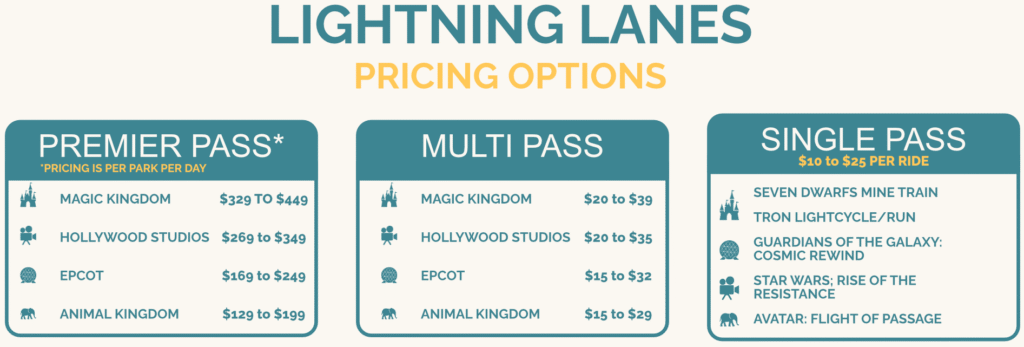
Lightning Lane pricing isn’t one-size-fits-all. MultiPass (LLMP) and Premier Pass (LLPP) are priced by park and fluctuate with expected crowd levels, while Single Pass (LLSP) pricing also shifts based on demand.
How and When to Book Lightning Lanes
When your purchasing window opens (7:00am, 7 days prior to resort arrival for on-property guests, 3 days prior to first park day for all other guests), you’ll have the option to purchase LLMP for each eligible member of your party for each day of the length of your visit, up to 10 days. As you purchase for each day, you’ll be given the opportunity to select your first three lightning lane ride reservations for everyone in your party for that day.
Lightning Lane Tier System
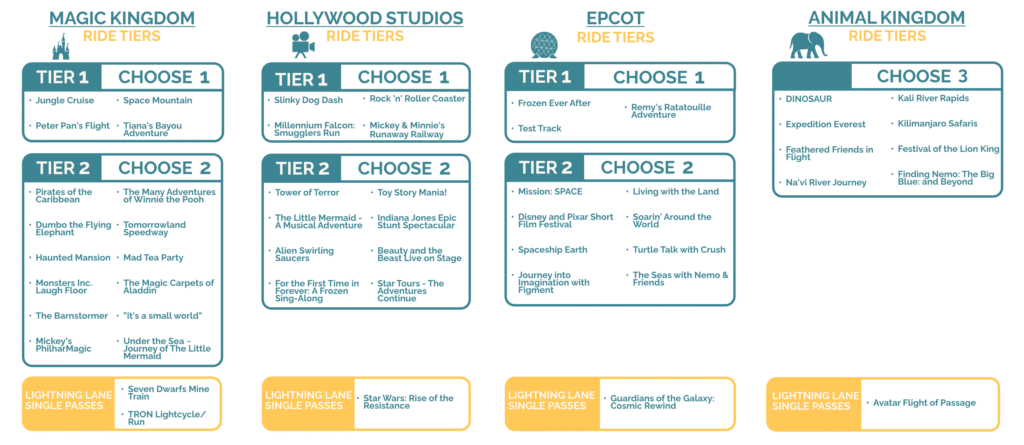
The first thing you need to know when booking your initial three Lightning Lanes is the tier system. The rides at each of the four WDW parks are broken into two tiers. Tier 1 rides are the most popular rides; Tier 2 are the less popular. When you select your initial three LLs for each day, you will be limited to one ride from Tier 1 and two rides from Tier 2 (or all three from Tier 2). These three LLs must all be selected from the park you’re starting your day at (the park you’ve purchased the LLMP for). Then, once you tap into your first LL of the day, the tier system goes away and all rides, regardless of tier, will be available for you to reserve (obviously, based on availability for the rest of that day). This includes rides in other parks if your ticket is eligible for park hopping. This means you could also modify your previously selected second and third LL to LLs at another park. Here are all the rides by tier for each park. Note that there is no Tier 1/2 designation at Animal Kingdom – all rides are in the same group.
Lightning Lanes Pitfalls to Avoid
Overestimating Lightning Lane Usage
Lightning Lanes are a great tool, but they’re not a magic wand. Don’t expect to ride everything just because you bought LLMP. Go in with a plan: make a short list of must-dos and let everyone in your group claim a favorite. Use that list to guide your first three reservations and the order you grab more throughout the day. Yes, it’s possible to score 10+ Lightning Lanes, but aiming for 5–6 solid picks keeps expectations realistic — and keeps you from sprinting back and forth across the park all day…unless of course, that’s your thing!.
Booking Low Priority Rides First
When you’re choosing your Lightning Lanes throughout the day, it’s important to remember that the most popular rides are going ‘sell out’ much earlier in the day (think Tiana’s Bayou Adventure, Slinky Dog Dash, Test Track, Space Mountain). If these rides are on your list, make sure you’re keeping an eye on LL return times in the app. If it’s 10:00am and you see the return time for Space Mountain is already 7:30pm, that’s your cue to get it booked soon as it’s going to ‘sell out’ sooner than later. Now, LLs are occasionally ‘refilled’ throughout the day, so you may see some additional availability, but don’t bank on this. Rule of thumb: the further out the return time is from the current time, the hotter that ride is. If it’s 10am and Space Mountain is already pushing 7:30pm return times, that’s your cue – book it now, because it won’t be around later.
Modifying vs Cancelling
As I mentioned, Lightning Lanes are occasionally refilled throughout the day. LLs are also regularly cancelled by other guests. It’s important to remember that once you have a LL booked, that return time (or even the ride) doesn’t have to be set in stone. Continuing to browse LL availability in the app throughout the day, if you find another ride or better time for your current reservation, you can simply modify the LL to make the change. The key here is to use modify (and not cancel). Cancelling runs the risk of you losing that particular LL return time altogether if another guest somehow gets your target before you can make the reservation. Modifying, ensures that you still keep a reservation while you continue to hunt for those precious refills.
Lightning Lanes FAQs
Can I see available return times for rides before purchasing?
Yes. You will actually select your first three Lightning Lanes reservations before you complete the purchase. You’ll see the return times once they’re selected.
How long do I have to complete my purchase?
Once you add the LLMP to your cart, you have 5 minutes to complete your purchase. Note that return times can shift slightly during this 5 minutes since you’re also competing with other guests who are also purchasing.
Can I stack Lightning Lanes reservations?
No. The max number of LL reservations you can hold is 3. This is a departure from the previous Genie+ system where you could book additional LLs after two had passed since your last booking (called the 120-minute rule).
Can I get a refund on my LLSP/LLMP/LLPP purchase?
Official answer: no refunds. Unofficial answer: it’s at cast member discretion. If you’ve got a good reason, it never hurts to call and politely ask.
Can return windows overlap?
Yes, but only when you manually select overlapping Lightning Lanes, the system will mostly avoid any overlap when booking your first three
Final Thoughts on Lightning Lnaes
I’ve now done two trips on the old Genie+ system and one with the new Lightning Lane MultiPass (LLMP), and honestly…the jury’s still out on which I prefer. The multi-pass system can feel intimidating at first, but a little prep goes a long way toward making it manageable.
Our trip last month (two adults, four kids ages 12+) was a full-on sprint across the parks type of week. We did five park days with a resort rest day in the middle (which was absolutely essential to recharge). The week of July 14th was rated “average” on the crowd calendar — more on that in a future post — but in true Florida style, it was brutally hot. Still, we went non-stop and made the most of it.
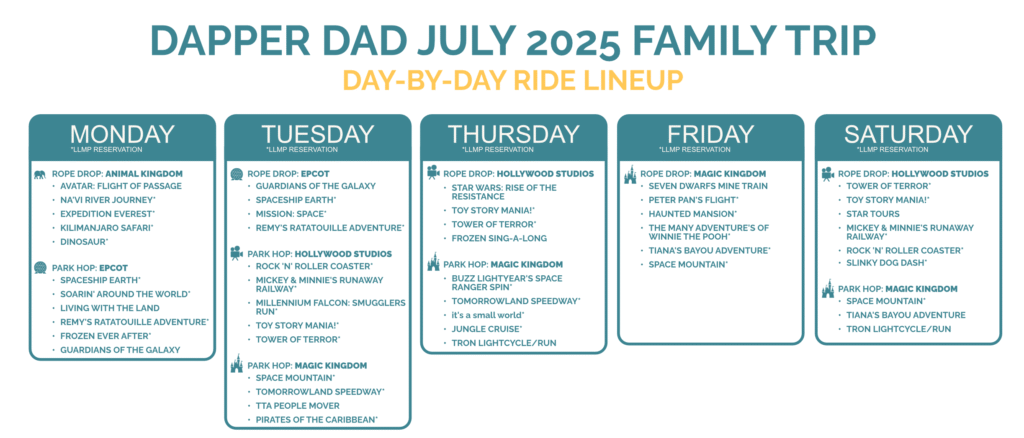
This may or may not be a realistic ride count for your family, but the point is: I went in expecting 5-6 Lightning Lane reservations per day and, with the exception of the insanity of Tuesday, ended up hitting exactly that most days. Along the way, we still carved out time for character meets (no longer LL-eligible under the new system), snack breaks (cheeseburger spring rolls are my go-to), and plenty of air-conditioned merch browsing.
For the most up-t0-date information on Lightning Lanes, visit official Walt Disney World website.
I’d love to hear from you — drop a comment below about your own Lightning Lane experience, any questions you have, or just share your favorite memory from the most magical place on earth.
See ya real soon!
– DD